Trade-up contracts on CS2Price: a step-by-step walkthrough
CS2Price · 2026-07-27 · 10 min read · 201 views ·
The mechanics themselves we covered in a separate article — where outcome odds come from, how the result float is calculated. This one is pure practice: where to click on CS2Price, what every number on screen means, and where people usually lose money. The screenshots are from live data; the prices are whatever was in the database at the time.
A word on access up front. Open to everyone: cross-market price comparison, item cards, collection pages, cases and the blog. Club only: the ready-made contract feed, the constructor, guaranteed crafts, live float listings, chains and the price-jump panel. After a Steam sign-in: your own inventory and the statistics table for your contracts.
Step 1. Start with the ready-made feed, not the constructor
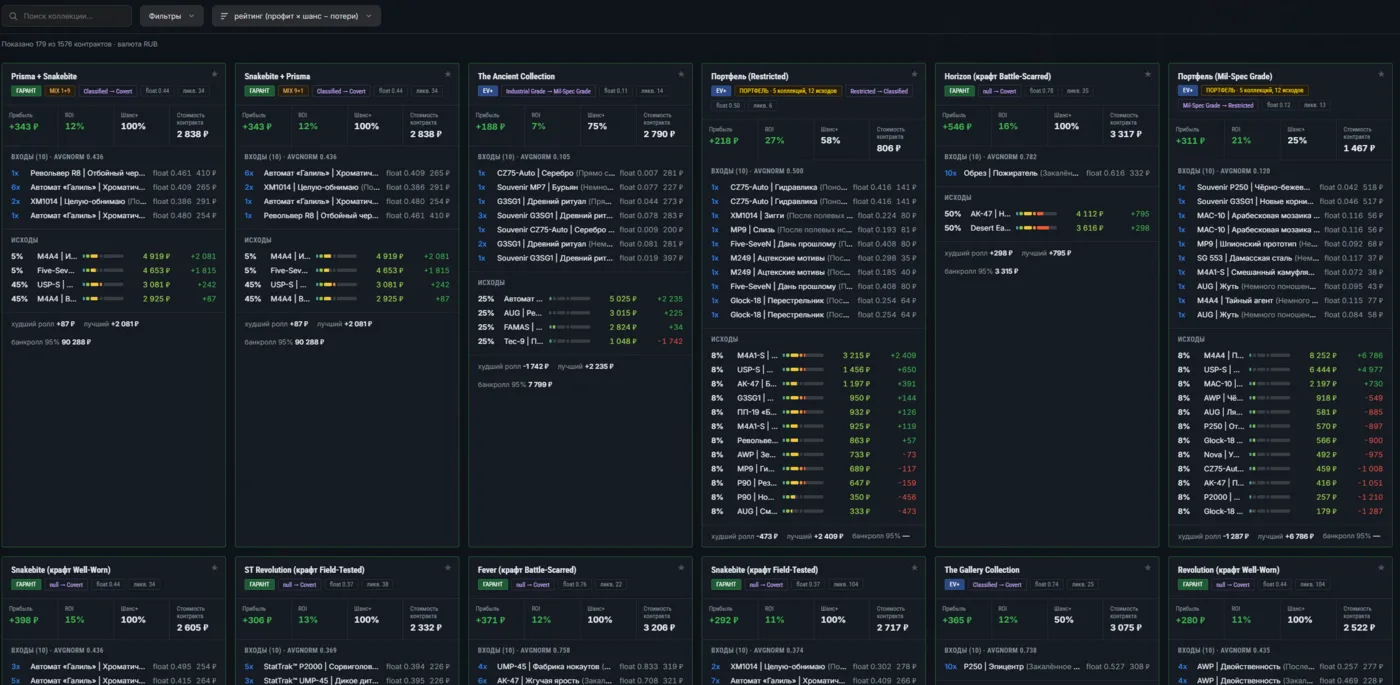
Building a contract by hand makes sense when you already have an idea. If you don't — open Profitable contracts. It holds combinations the engine recalculated against current prices from every market in our database. The public page shows the top of the list; the full feed with filters, sorting and the cards shown below is a club section. At the time of the screenshot there were 1,576 contracts in the base and 179 left on screen after the default filters — the line under the header shows it.
The contract feed: rating sort, GUARANTEED and EV+ badges, each card lists inputs, outcomes, worst and best roll.
The default sort is rating (profit × chance − losses), not «best profit». That matters. A contract with +$23 profit and an 8% chance will drain you faster on average than one with +$3.50 and a 100% chance: in the second case you simply get your money back with a markup, in the first you're buying a lottery ticket. The rating also accounts for what you lose on bad outcomes.
What the badges and numbers on a card mean
GUARANTEED — even the cheapest outcome is worth more than the inputs. The worst roll is still profitable; there are no losing branches at all.
EV+ — expected value is positive, but some outcomes lose money. Profit here shows up over a distance, not in one spin.
PORTFOLIO — inputs are pulled from several collections at once (e.g. «5 collections, 12 outcomes»). MIX 9+1 — from two, nine items from one and one from another.
float 0.44 — the average normalised float of the inputs. It determines the wear and the price of the result.
liq. 34 — the lowest sales volume among the outcomes. A liquidity of 3 means you'll be selling that winning skin for a week.
Chance+ — the combined probability of outcomes that are profitable on their own. Bankroll 95% — how much capital you need to be ~95% sure of hitting at least one profitable outcome.
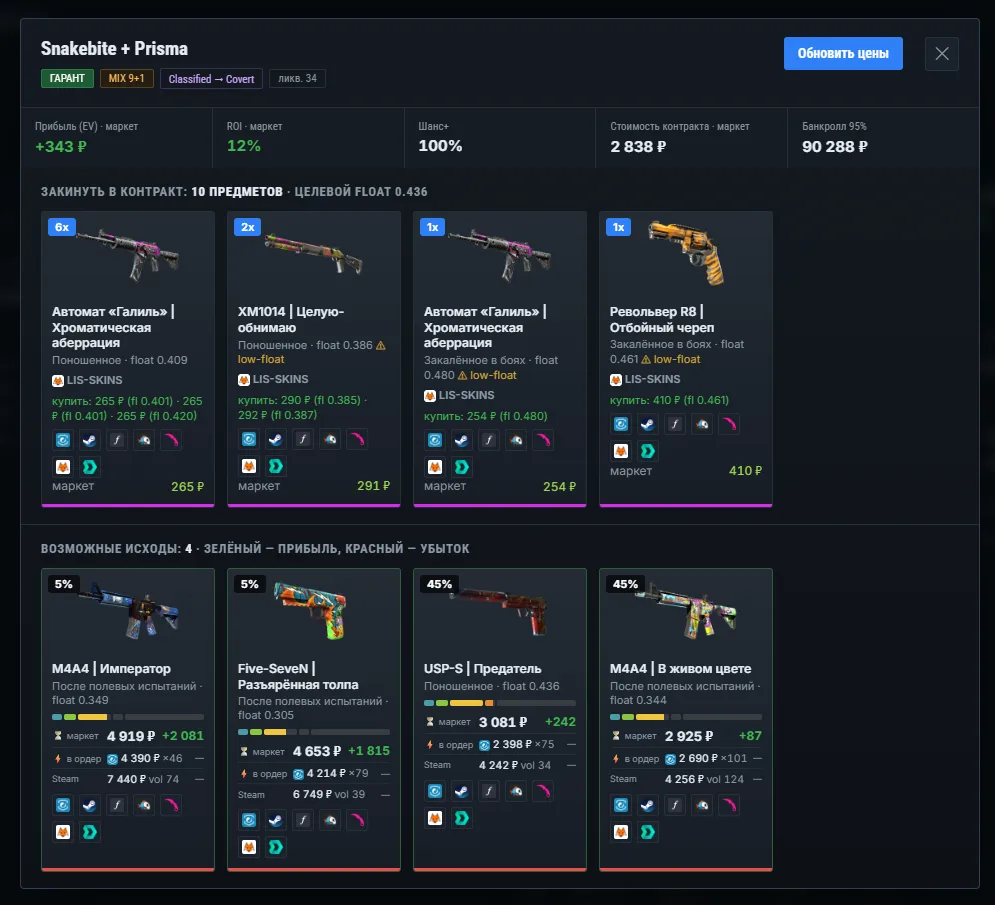
Clicking a card opens it in full: the input list with counts and per-item prices, the target float, and every possible outcome with its probability. A green frame means profit, red means a loss.
Snakebite + Prisma: +$4 EV on a $33 cost, Chance+ 100%. Four outcomes — two at 5% and two at 45%, all profitable.
GUARANTEED is not a promise of profit. It's the state of prices at calculation time. While you're buying inputs a seller can pull a listing and the outcome price can slide. The «Refresh prices» button inside an open card recalculates everything; press it before you buy, not after.
Step 2. Check where the inputs can actually be bought
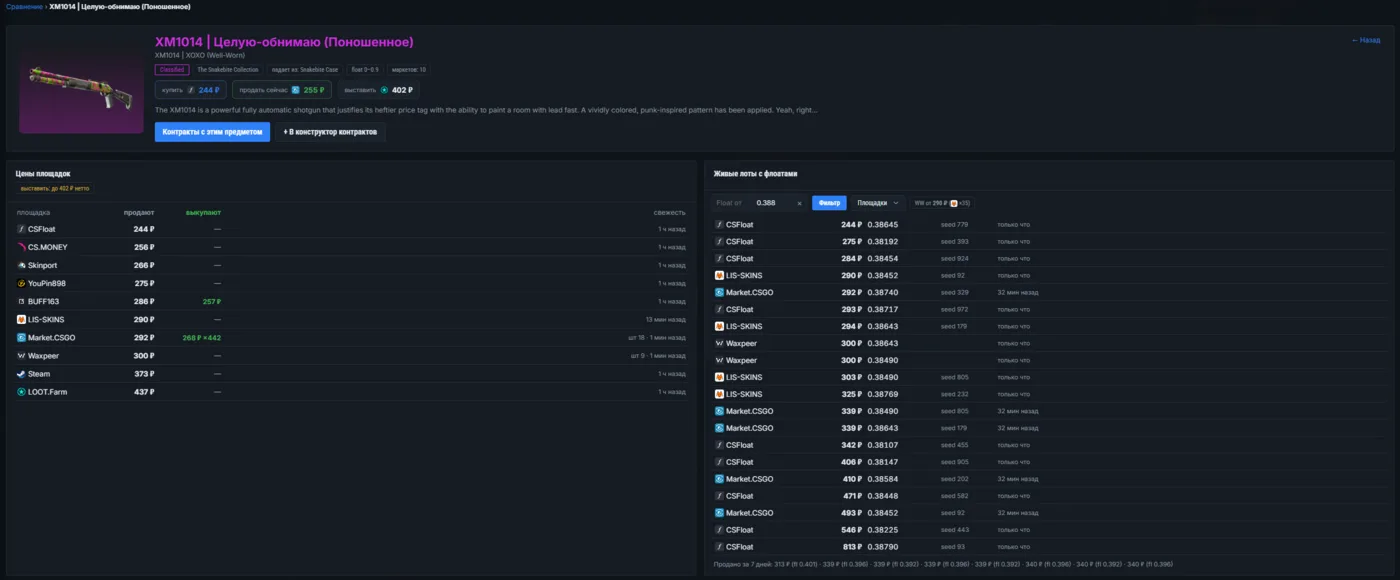
A contract needs not just skins but skins at a specific float. Any item links to its comparison card. The left half — prices across all markets — is open to everyone, no sign-in. The right half, with live listings, floats and seeds, works for club members: it's the most expensive data we collect and the reason we keep our own database.
Item card: 11 markets with ask and bid prices on the left, float-filtered listings on the right. Actual sales over the last 7 days at the bottom.
Look at the spread in the right column: the same XM1014 at a float around 0.384 costs anywhere from $2.80 to $9.40. The difference isn't the item — it's the marketplace and the seller's greed. The «Float from» field cuts off listings the contract can't use, and the bottom line shows what the skin actually sold for over the week — more honest than any average.
The «Contracts with this item» and «+ Add to constructor» buttons on the item card work both ways: you can go from a contract to an item, or from an item to every contract it appears in.
Step 3. The constructor: build a contract by hand
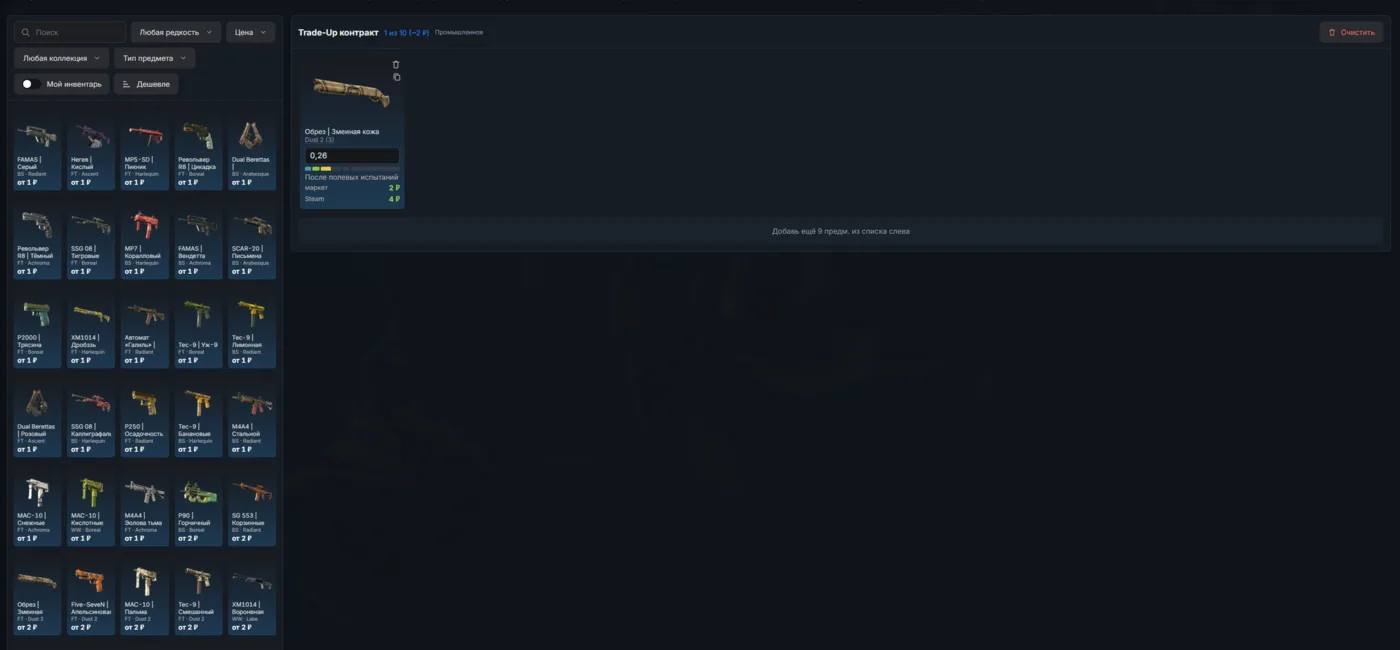
The Constructor is ten empty slots and a catalog on the left; it's a club section. Filters on top: search, rarity, price, collection, item type. The «Cheaper» button sorts the catalog by ascending price — a good starting point when you're testing an idea and don't want to spend money.
The first item in a slot. The float in the white field can be edited by hand — the engine recalculates the result immediately.
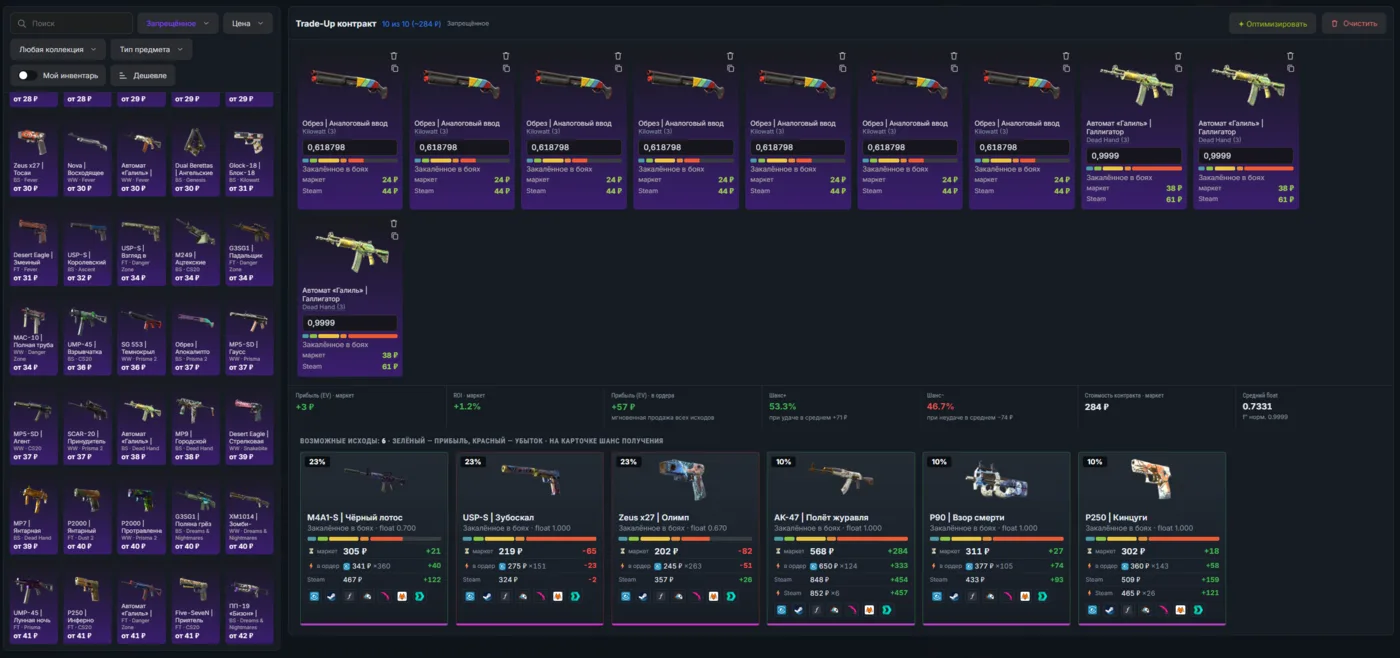
The key detail: every input's float is editable. You type in the float of the listing you actually intend to buy — and see what you will get, not what an average player would. The copy icon next to an item duplicates it into the remaining slots so you don't click ten times.
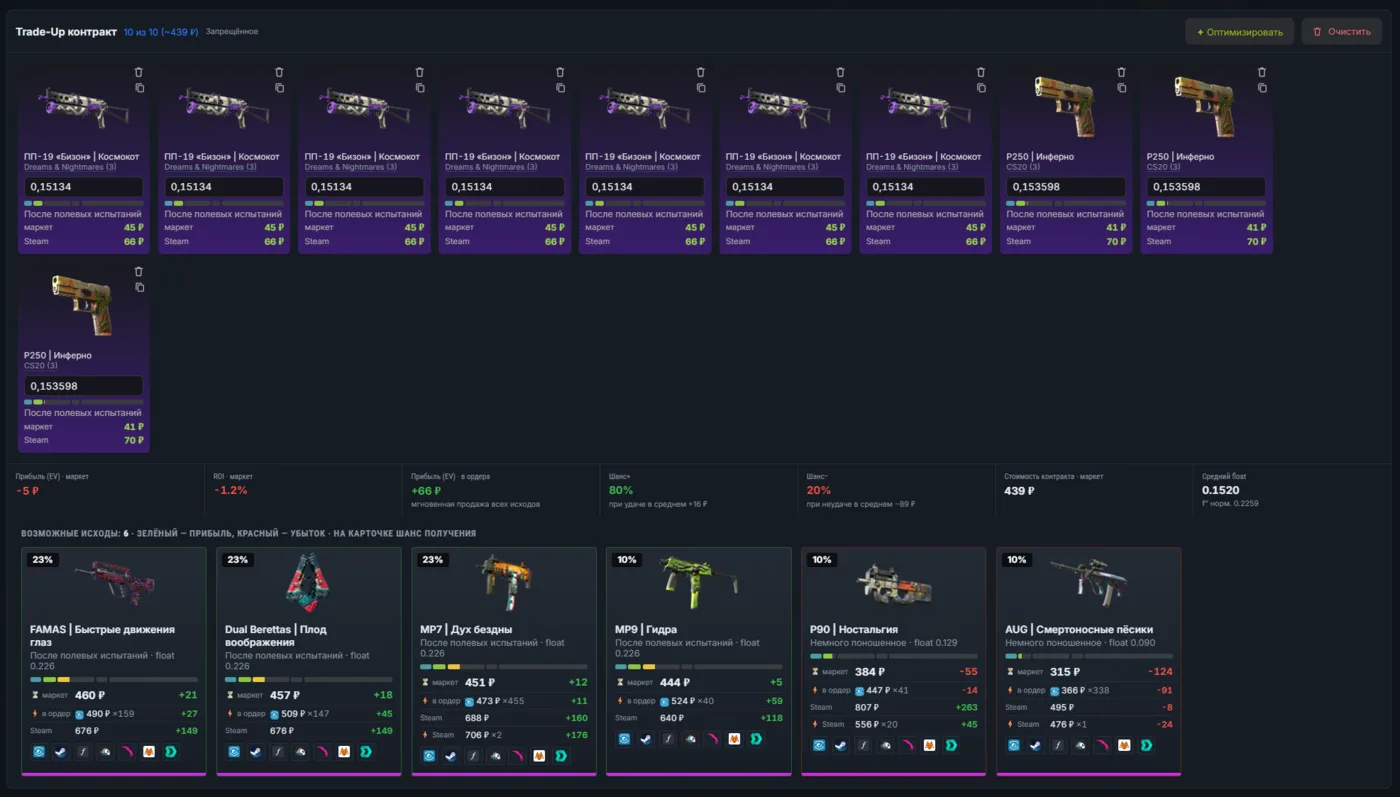
An assembled contract: 7 Sawed-Offs and 3 Galils give six outcomes. The top panel computes EV, ROI, odds and cost at current prices.
Once all ten slots are filled the calculation appears on top. «Profit (EV)» is the average across outcomes weighted by their probabilities. «EV to buy orders» is the same but assuming you dump the result into an existing buy order instead of listing and waiting; that figure usually differs most where the spread is wide. «Chance+» and «Chance−» show what share of the probability sits on profitable versus losing branches.
Step 4. Your own inventory and the trade link
The «My inventory» toggle swaps the catalog for your own items. Without a linked trade URL we only see the public Steam inventory — no floats there, so the calculation will be approximate.
Until the trade link is connected, the constructor honestly warns that it's working without floats.Once linked, every item shows its real float and a price estimate — from ~$0 to ~$11 in this inventory.
The «Recommend» button walks through your items and suggests contracts you can assemble right now without buying anything. It's the fastest way to find out whether something in your inventory is worth spinning — cheap low-rarity skins, exactly what contracts are made of, tend to pile up at the bottom of an inventory.
Star the contracts you like
The feed is recalculated on live prices, and a contract you eyed yesterday can slide from page two to page twenty today. The star in the top-right corner of a card fixes that: starred contracts go into a separate list opened by the «Favorites» preset. The mark lives in your browser and survives a feed rebuild — we store the contract itself (collection, rarities, composition), not a row number. A workable routine: skim the feed, star three or four candidates, then compare them calmly in favorites instead of digging through fifteen hundred cards again.
Why input float decides everything
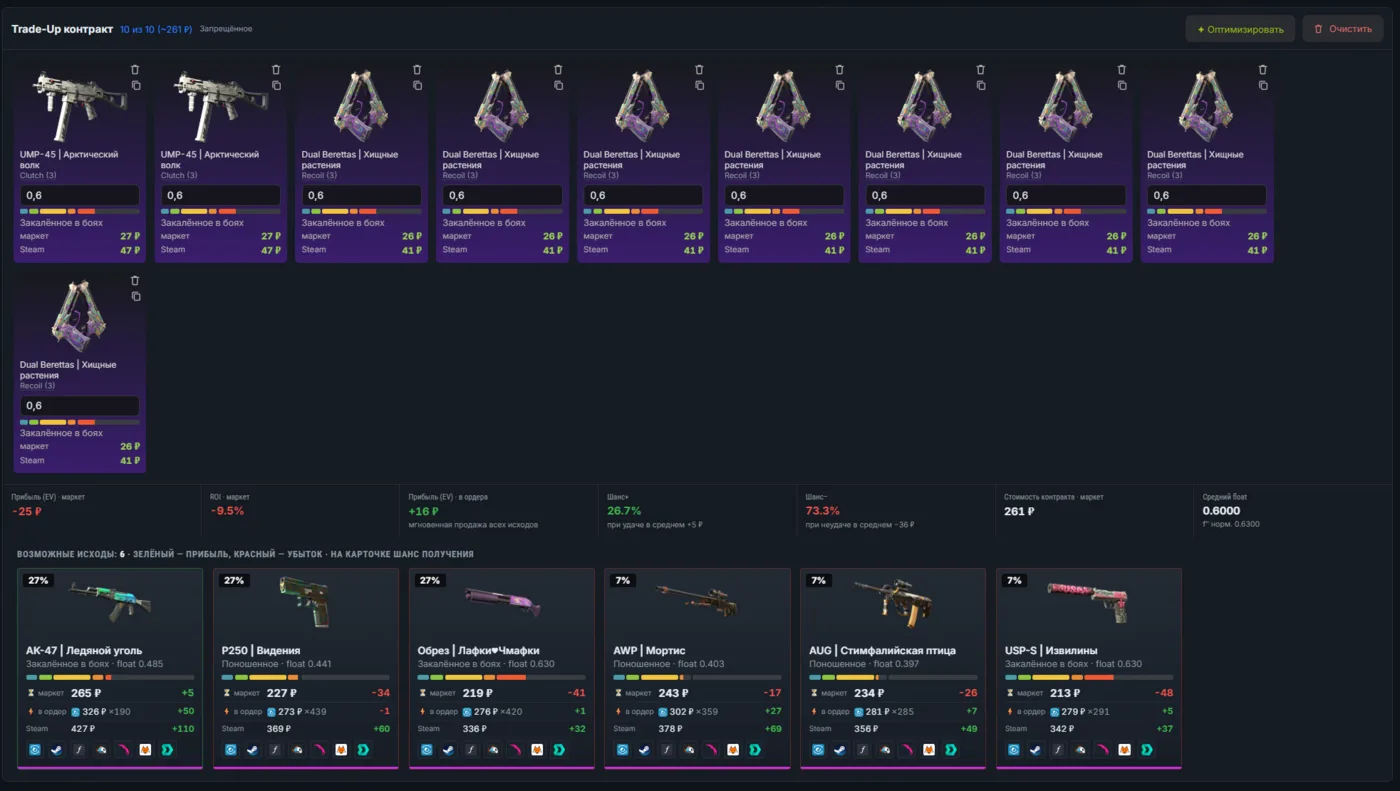
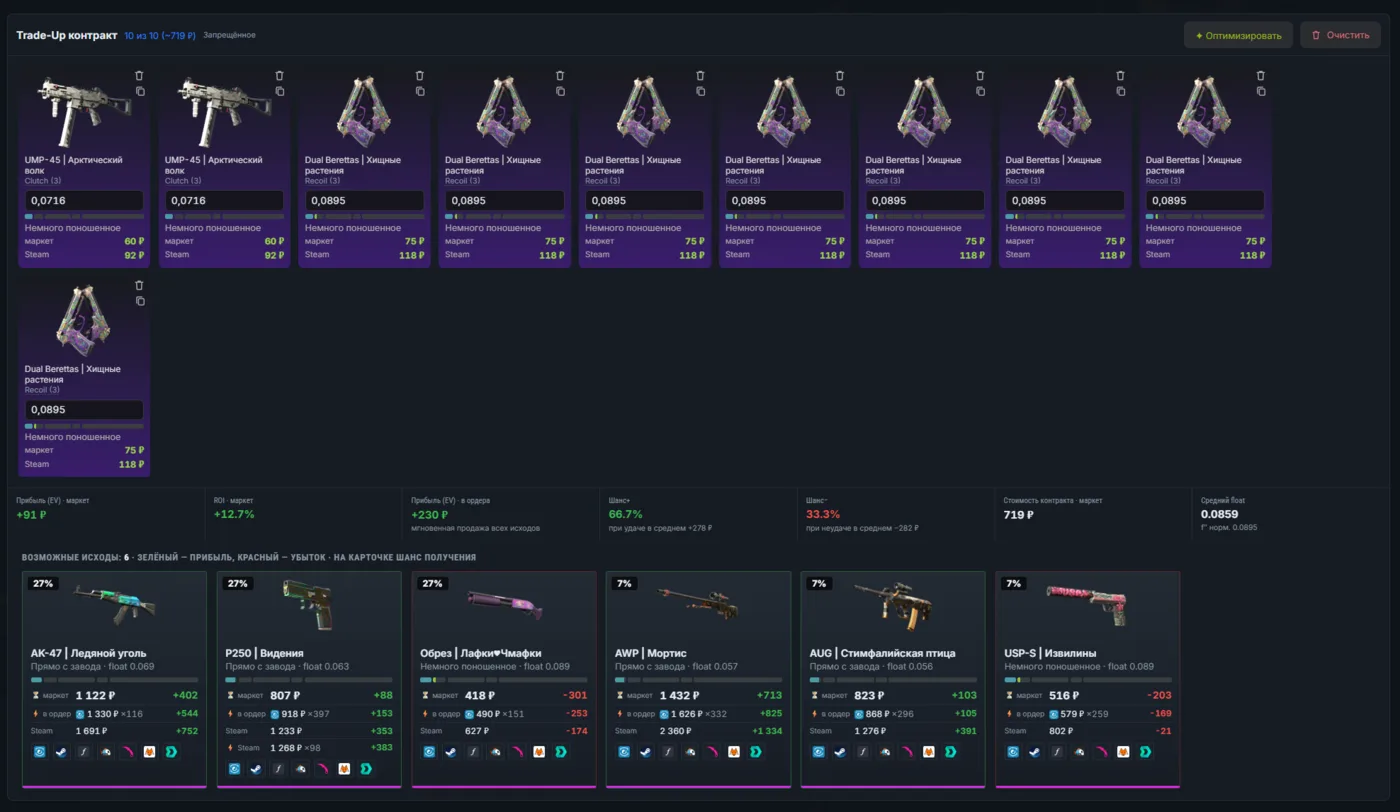
This is the most common beginner mistake: taking the right combination of items, buying the cheapest listings — and ending up negative. Below is one and the same contract, the same items, differing only in input float.
Inputs at float 0.6: the contract costs $3, EV −$0.30, ROI −9.5%, Chance+ only 26.7%.The same items at float 0.07–0.09: cost rises to $8.30, but EV turns +$1.05, ROI +12.7%, Chance+ 66.7%.
Twenty-two percentage points of ROI — purely from input wear. The logic is simple: the result float comes from the average normalised float of your ten items, remapped into the wear range of that particular outcome. Low inputs give Factory New and Minimal Wear on the output, high ones give Battle-Scarred. And the price gap between FN and BS on the same skin is routinely three- to fivefold.
Cheap inputs almost always mean high float. Before celebrating a low contract cost, look at the AVGNORM line and at the wear names in the outcome list.
Losing contracts are useful information too
The constructor doesn't stop you from assembling a knowingly bad combination, and it doesn't hide the result. That's deliberate: seeing a red EV before you buy is far more useful than seeing it after.
An 80% Chance+ looks great, yet EV is still −$0.06: one outcome in five eats the entire gain of the other four.
Worth remembering. A high «Chance+» guarantees nothing by itself: if the single losing outcome is worth half the inputs, it outweighs four small wins. Read the pair «EV + worst roll», not the hit percentage alone.
Count the series, not a single spin
A contract with +$4 EV doesn't mean you'll receive $4. It means that over many identical spins the average result converges to that number. On a single spin you'll get either +$24 or +$1 — as in the Snakebite example above. That's why every card footer carries «bankroll 95%»: the capital needed to reach a profitable outcome with ~95% probability instead of quitting halfway.
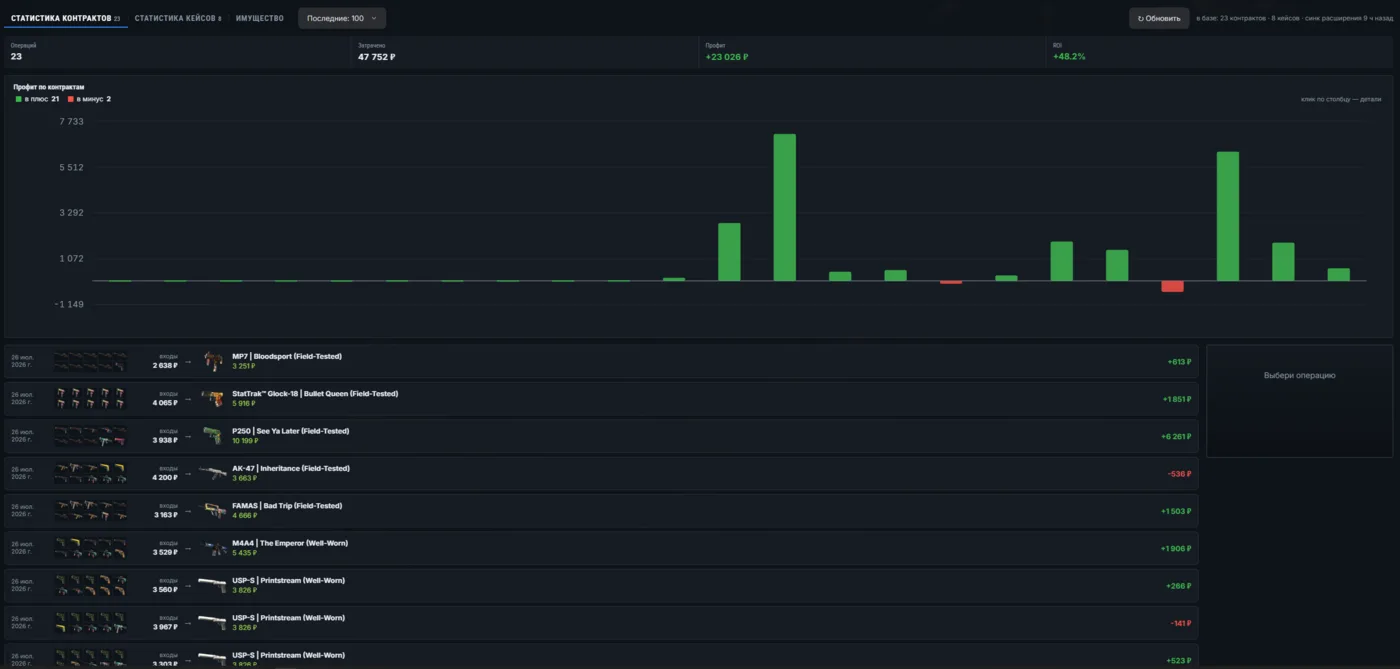
A real series of 23 contracts: $551 spent, +$266 profit, +48.2% ROI. Twenty-one winners, two losers.
That's the statistics tab: each bar is one spin, green up, red down. Note the shape — half the operations returned pennies, two went negative, and three or four big hits made the entire series. That's the normal picture for contracts, and it's worth seeing before the first bad roll upsets you.
The data gets there on its own: the CS2Price Sync browser extension reads your Steam trade history and sends it to the site. Nothing to type by hand — the header shows when the last sync happened.
And it's the only way to check a forecast against fact. For every spin the table shows what you put in, what dropped and what it came to in money — the real CS2 contract outcome, not the projected one. Compare it against the EV from the card: if a run of ten contracts lands consistently below the calculation, you're either overpaying for inputs or selling outcomes worse than the engine assumes. That only shows up in your own history.
What the club adds
Free and without a sign-in you get everything that helps pick and value an item: price comparison across 11 markets, item cards, collection pages, cases and the blog. A Steam sign-in adds your own inventory and the statistics table. Everything contract-related — the ready-made feed, the constructor, guaranteed crafts, live float listings, chains and the price-jump panel — comes with club membership.
On top of section access, the club adds hand-picked selection over the machine calculation: the club publishes guaranteed contracts with profit from $58, where every outcome is checked for liquidity and for the actual availability of inputs at the required float.
The difference is the filtering: the engine finds 1,500+ mathematically positive combinations, but most of them run into either outcome liquidity or the simple fact that enough inputs at the needed float don't exist on the markets. Only a human eye filters that out. Club terms are on the homepage.
A short pre-purchase checklist
Pressed «Refresh prices» in the card — the calculation is fresh, not an hour old.
Looked at the «worst roll»: how much you lose if it goes badly.
Checked outcome liquidity — selling the result at a sane price has to be realistic.
Opened the live listings and confirmed inputs at the needed float are actually for sale, not a single copy at triple price.
Compared «EV to buy orders» against plain EV: a wide gap means selling the result will take time.
Matched the 95% bankroll against what you're willing to spend.
Starred the contract if you're not buying right now — it will get lost in the feed otherwise.
FAQ
What is free and what is club-only?
Free without signing in: price comparison across 11 markets, item cards, collection pages, cases and the blog. After Steam sign-in: your inventory and stats for your own contracts. Club-only: the feed of ready-made contracts, the builder, guaranteed crafts, live listings with floats, chains and price-drop alerts. Plus hand-picked guaranteed contracts with $58+ profit.
Where do the prices come from and how fresh are they?
From our own database: we collect prices from 11 marketplaces plus Steam and store them ourselves. The site never calls third-party services at request time — that is why a contract computes in milliseconds. Data age is shown in the "freshness" column on the item card.
Why is a contract that was profitable yesterday losing today?
Because someone bought the cheap inputs or listed the outcome cheaper. Contracts are a snapshot of the market, not a static list. That is exactly why the card recomputes on demand and the feed keeps reshuffling.
What is AVGNORM on the card?
The average normalized float of the ten inputs — a number from 0 to 1. The result's float is derived from it using each outcome's wear range. The lower it is, the better the wear and the pricier the output.
Can I build a contract from items of different collections?
Yes, and it is often more profitable. Such builds carry the MIX badge (two collections) or PORTFOLIO (several). Every input adds its collection's outcomes to the draw, so mixing changes both the odds and the set of possible results.
Why link a trade URL?
Without it we only see your public Steam inventory, which has no floats. With it the builder takes the real floats of your items and computes the contract precisely instead of approximately.
Is the extension required?
No, it is only needed for automatic statistics on your contracts and cases. Everything else works without it.
How do I save a contract so I don't have to find it again?
With the star in the top-right corner of the card. Starred contracts gather in the "Favorites" preset. The mark is stored in your browser and survives feed rebuilds.
How do I find out how much I actually earned?
Install the CS2Price Sync extension — it pulls your trade history from Steam, and the stats tab shows the real result of every contract: costs, outcome and profit in money. That is where the EV forecast meets reality.
 CS2Price